12 Prompts That Instantly Make Any AI Video 10× More Cinematic
Transform your AI-generated videos from amateur to Hollywood-grade with these 12 powerful prompt techniques. Learn the exact words that unlock cinematic magic in tools like Runway, Pika, and more.
12 Prompts That Instantly Make Any AI Video 10× More Cinematic
What separates an amateur AI video from a cinematic masterpiece? The prompts.
I've spent months testing thousands of AI video generations, and I've discovered that certain phrases, modifiers, and techniques instantly elevate your results. These aren't just random keywords—they're the difference between "meh" and magnificent.
Here are the 12 prompt secrets that transformed my AI videos from flat to film-worthy.
1. "Golden hour lighting with rim light"
This is the nuclear option for instant cinematic beauty. Golden hour (sunrise/sunset) creates warm, diffused light that flatters everything. Add "rim light" and you get that glowing halo effect around subjects.
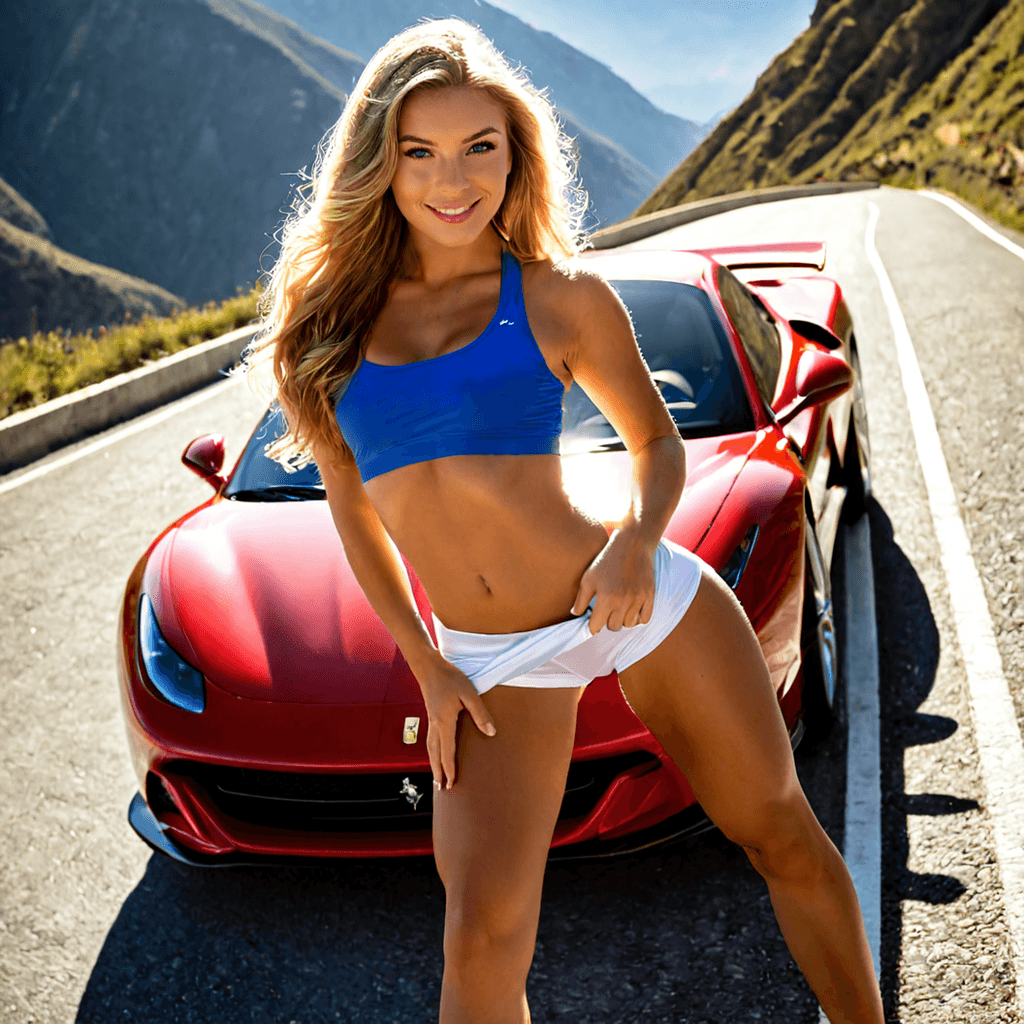
Example: "Woman standing by Ferrari F8, golden hour lighting with rim light, mountain highway backdrop"
Why it works: Professional cinematographers spend thousands on lighting setups to replicate what nature does for free during golden hour.
2. "Anamorphic lens flare"
Want that JJ Abrams / Christopher Nolan look? Anamorphic lens flares add instant prestige. These horizontal streaks of light scream "big budget production."
Example: "Sports car driving through tunnel, anamorphic lens flare, moody atmosphere"
Pro tip: Combine with "bokeh" for extra depth.
3. "Shallow depth of field, f/1.4"
This is cinematography 101. Shallow depth of field (blurred background) isolates your subject and creates visual separation from the environment.
Example: "Close-up portrait, shallow depth of field f/1.4, cinematic bokeh"
Why f/1.4?: It's a real-world aperture setting that AI models associate with premium camera gear.
4. "Drone shot pulling back to reveal"
Movement = emotion. A slow drone pullback creates anticipation and scale. This technique is used in every blockbuster trailer.
Example: "Drone shot pulling back from subject to reveal epic mountain landscape"
Bonus: Add "slow motion" for extra drama.
5. "Cinematic color grading, teal and orange"
The teal-and-orange color palette dominates modern cinema. It's visually striking and immediately recognizable as professional-grade.
Example: "Night city scene, cinematic color grading, teal and orange tones"
Why it works: Complementary colors create visual tension and balance.
6. "Volumetric lighting through fog"
Light beams cutting through fog/smoke add atmosphere and depth. This is the "god rays" effect you see in forest scenes and concert footage.
Example: "Forest path, volumetric lighting through morning fog, mystical atmosphere"
Pro tip: Works amazing for music videos and fantasy content.
7. "Slow tracking shot at eye level"
Static shots feel like YouTube. Tracking shots feel like cinema. Specify "eye level" to maintain that human, immersive perspective.
Example: "Slow tracking shot following subject walking, eye level camera, urban environment"
Why it works: Movement engages viewers and creates momentum.
8. "Film grain, 35mm aesthetic"
Digital perfection can feel sterile. Adding film grain gives your video texture and authenticity—the look of classic Hollywood.
Example: "Retro car commercial, film grain, 35mm film aesthetic, vintage vibes"
Bonus: Combine with "kodak portra" or "fujifilm" for specific film stock looks.
9. "Dutch angle with dramatic shadows"
Dutch angles (tilted camera) create unease and dynamism. Perfect for action scenes, music videos, or anything edgy.
Example: "Cyberpunk street scene, dutch angle, dramatic shadows, neon lights"
Warning: Don't overuse—it's a spice, not the main dish.
10. "Establishing shot with epic scale"
Start your videos with a wide, establishing shot that shows the full environment. This grounds your viewer and sets the mood.
Example: "Wide establishing shot of mountain highway, epic scale, sweeping vista"
Pro tip: Use this as your opening frame, then cut to closer shots.
11. "Handheld camera with natural shake"
Sometimes you want that raw, documentary feel. Handheld camera movement adds authenticity and energy—great for street scenes or action.
Example: "Street chase scene, handheld camera with natural shake, gritty realism"
When to use: Music videos, vlogs, guerrilla filmmaking aesthetics.
12. "Cinematic aspect ratio 2.39:1"
Aspect ratio matters. 2.39:1 (ultra-widescreen) is the Hollywood standard. It instantly makes your video feel more cinematic.
Example: "Action scene, cinematic aspect ratio 2.39:1, widescreen composition"
Note: Some AI tools support this natively—check your settings!
Bonus Pro Tips
- Stack multiple techniques: "Golden hour + anamorphic flare + shallow depth of field" = instant magic
- Be specific about camera movement: "Slow dolly push-in" beats just "moving camera"
- Reference real cinematographers: "Roger Deakins lighting style" or "Emmanuel Lubezki camera work"
- Use negative prompts: Remove "shaky, blurry, distorted, ugly, low quality"
The Secret Sauce: Combination
The real power comes from combining 3-4 of these techniques in a single prompt. Here's my formula:
[Subject] + [Lighting] + [Camera Movement] + [Color Grading] + [Technical Details]
Example: "Blonde woman leaning against Ferrari F8 on mountain highway, golden hour lighting with rim light, slow drone pullback, cinematic color grading teal and orange, shallow depth of field f/1.4, anamorphic lens flare, film grain 35mm aesthetic"
Your Turn
Try these prompts in your next AI video generation. Pick 3-4 techniques, combine them, and watch your videos transform.
The difference between amateur and cinematic isn't talent—it's knowledge. Now you have it.
What's your favorite cinematic prompt trick? Drop it in the comments or share your results in our Discord community.
Want to create stunning AI videos and images? Join CrimsonVisuals and access our advanced generation tools. Early adopters get 15% lifetime discount.